

Tips in dealing with Gitlab in everyday devices
Now that we have shown when and why we use Gitlab in projects, we would like to look at the practice. Because the true strength of Gitlab is not only evident in the strategic decision for the platform, but especially in daily use of it. Experience, best practices – and also one or two stumbling blocks gather here quickly. In the following we share tips from our project day that help you use Gitlab more efficient, safe and sustainable.
Typical errors – and how to avoid them elegantly
Of course, something can go wrong when working with Gitlab. Here are a few frequent stumbling blocks from the project day – and how you simply avoid them:
Secret access data accidentally commemorated
A classic: passwords or api tokens end up in the repository. Removing such data from the GIT history is tedious and prone to errors.
Our tip: Cut the secrets in your own files with SOPS or outsource it in a vault and activate a secret scanner.
Direct work in main-Branch
Changes directly in the main industry make cooperation difficult, increase the risk of merge conflicts and can lead to unstable deployments.
Our tip: Consistently use feature industry and merge requests. Protects the main-Slanch via the repository settings.
Slow pipelines due to the lack of caching
Without targeted caching, builds and tests take significantly longer than necessary.
Our tip: Uses cache:-Blocks for frequently used dependencies such as Node_Modules, composer or docker layer.
Recurring jobs repeatedly copied
This makes CI/CD configurations confusing and difficult to wait.
Our tip: Storage recurring jobs (e.g. tests, linting, security checks) in Template from include: a.
Unnecessary jobs carried out at small changes
If linting or build still runs in text or documentary changes, the unnecessary resource consumption is.
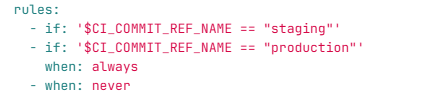
Our tip: With rules: or only:-Definitions can skip certain jobs in a targeted manner -saves time, money and energy.
Efficient Gitlab hacks for the project
Here are a few best practices with which you can not only make your pipelines faster, but also more sustainable:
Targeted CI/CD caching
With cache:-Blocks can be z. B. reuse node_modules, composer incipulation or docker layers-this often reduces pipeline duration 30–70 %.
Introduce the templates for recurring jobs
Whether tests, code scans or security exams-centrally neat .yml-Templates make your CI/CD configurations slimmer, clearer and easier to wait. Incorporate include: Saves time and reduces errors.
Skip jobs with uncritical changes
With rules: or only:Criteria can be specifically deactivated (e.g. linting in the case of document changes) -which protects resources and shortened waiting times.
Just build what changes
Intelligent build jobs recognize whether anything has changed in the relevant part of the code. Use for it changes:-S information-particularly useful for mono reposes.
More tips about Gitlab? Here is the Gitlab Cheat Sheet for free download.
Source: https://www.protos-technologie.de/2025/09/22/warum-wir-in-projekten-auf-gitlab-setzen/